
Organise playlists by purpose as well as genre
Genre playlists are a useful starting point, but they only tell part of the story. A DJ often needs to choose by function: records for opening a room, tracks that build pressure, a familiar vocal, a reset after a big moment, or a final run of high-energy selections. Playlists built around those decisions are easier to use under pressure than one broad collection labelled with a genre.
For recurring venues, create a folder for the venue and keep a few working playlists inside it. You can then reuse the successful foundations from previous bookings while adjusting for the time slot, audience and latest music. This keeps preparation fast without making every set feel identical.
Prepare metadata before relying on it live
Rekordbox can analyse BPM and key, but analysis is only the beginning. Check the records that are important to your set, especially edits, bootlegs and files with unusual tempo changes. Correcting a key or beat grid before the event gives you more confidence when you filter and compare options later.
Energy is also worth thinking about consistently. You can use My Tag, comments or playlist placement to distinguish a smooth groove from a full peak-time record. The exact system matters less than using it the same way across your library. Consistency lets your playlists communicate something useful when you are making a quick choice.
Use the active playlist to keep suggestions relevant
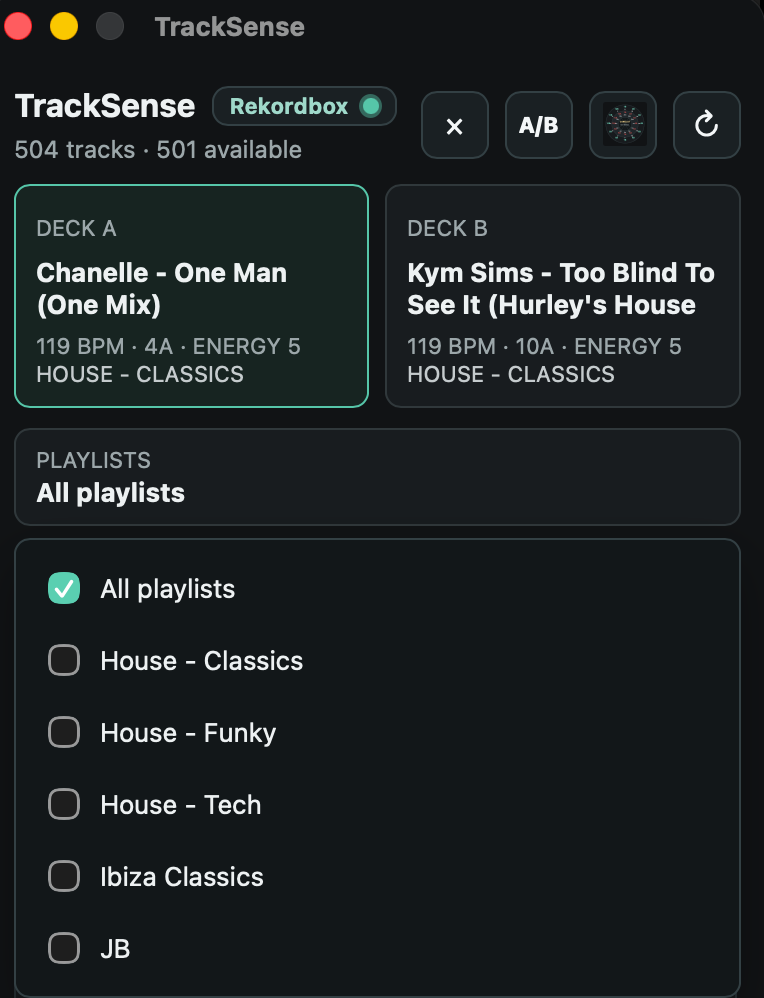
In Performance mode, it is easy to be distracted by the full collection. Start with the playlist that reflects the section you are in. From there, select tracks that work with the current deck's BPM and key, then judge their energy and arrangement. This gives you a tight pool of realistic candidates rather than a long list of technically compatible but stylistically unrelated tracks.
There are times when the right move is outside the playlist. That is a reason to broaden the search, not a reason to abandon structure. Switch playlists when you are changing direction, or use the full library when you intentionally want an unexpected bridge. The playlist should guide the decision, not limit it.
Review the playlist after the set
After a gig, review the Rekordbox history and note which tracks reliably followed each other. Move strong pairings into the relevant playlists and remove records that repeatedly feel out of place. This turns each set into preparation for the next one.
Qoovio works alongside Rekordbox to propose next tracks from the playlists you select. It considers BPM, harmonic key, energy and playlist fit, helping you scan a shortlist while keeping your focus on the mix and the dancefloor.